

Melissa
reference Facts, options, APIs
Melissa is a widely used address validation and data quality service that helps organizations keep address data accurate, standardized, and up to date.
Enricher version: V1
API key: your Melissa license key
To set up the enricher, see Add REST API enricher, then use the settings and script on this page.
CluedIn can connect to Melissa through its REST API, sending address data for validation. The API responds with standardized and enriched results, which CluedIn processes and maps to the appropriate vocabulary keys for storage and further use.
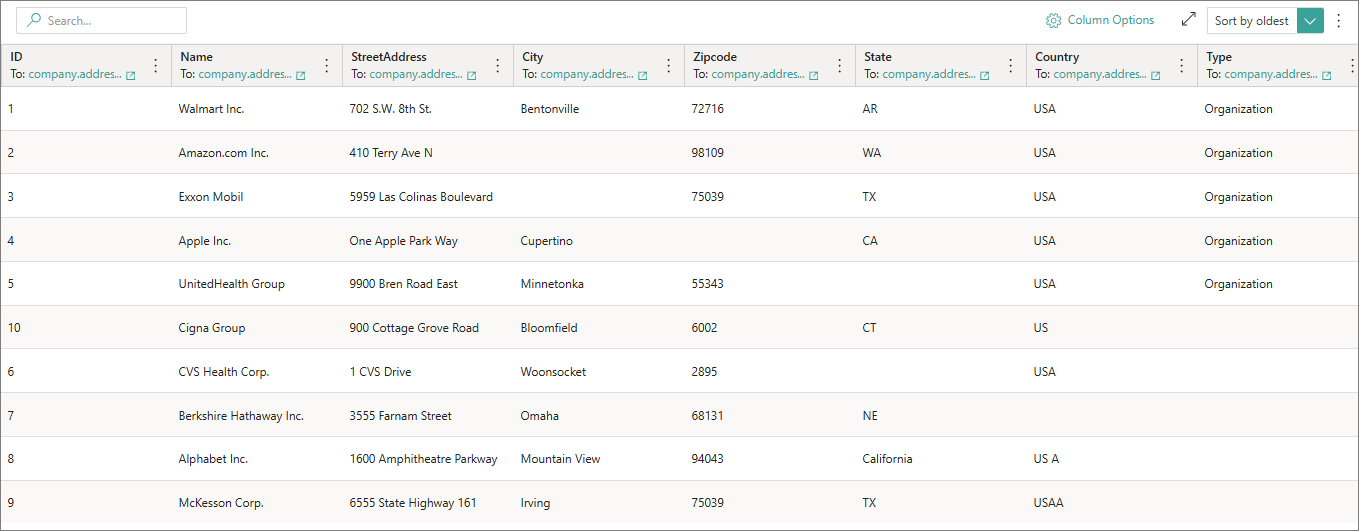
In the following example, ingested company data contains missing or incorrect address details. We will use Melissa REST API calls to send address-related data stored in different vocabulary keys and enrich golden records with validated and parsed addresses.
Configure Melissa REST API enricher
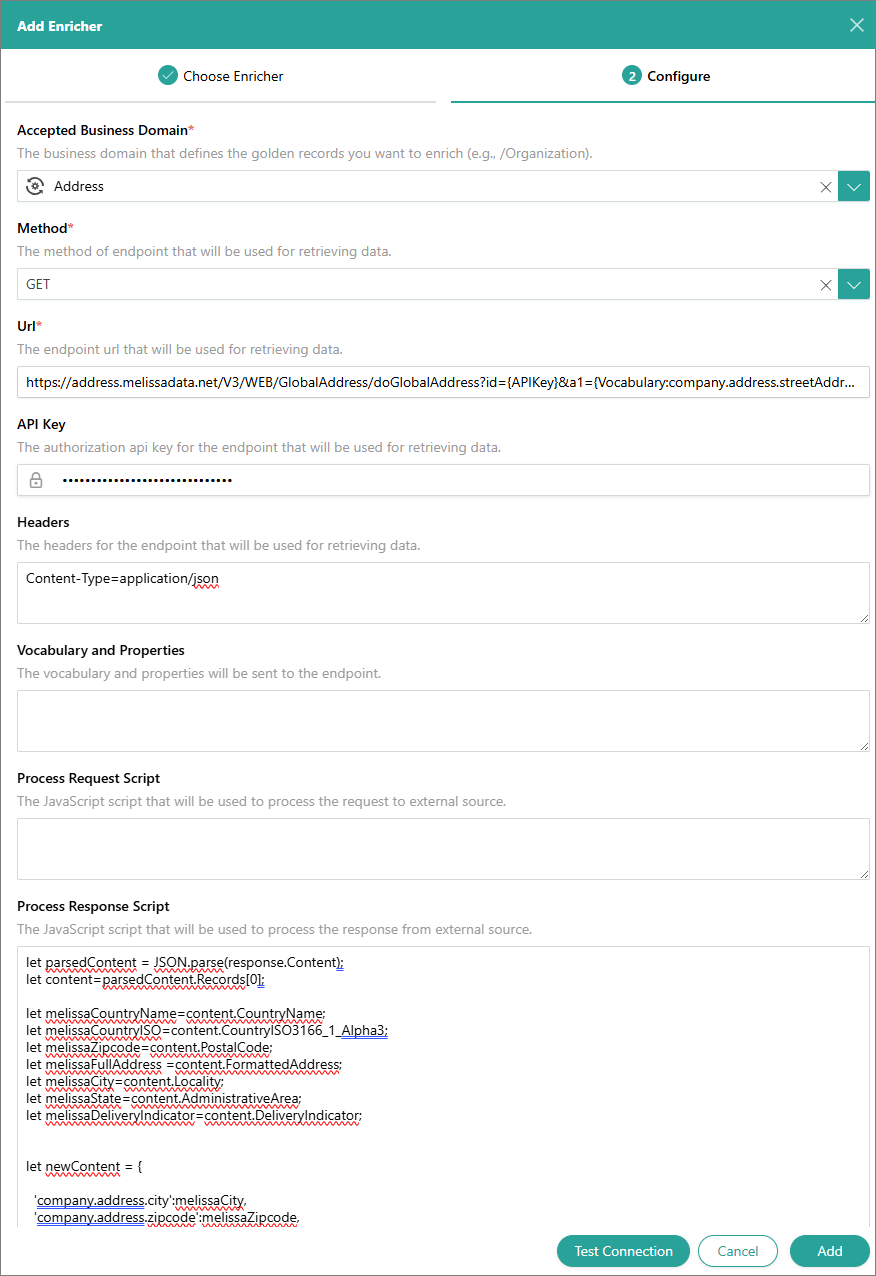
To add the Melissa REST API enricher, on the Configure tab, provide the following information:
Accepted Business Domain: In this example, /Address.
Method: GET.
URL
In this example, the URL references several vocabulary keys that store address-related data.
https://address.melissadata.net/V3/WEB/GlobalAddress/doGlobalAddress?id={APIKey}&a1={Vocabulary:company.address.streetAddress}&loc={Vocabulary:company.address.city}&admarea={Vocabulary:company.address.state}&ctry={Vocabulary:company.address.country}&postal={Vocabulary:company.address.zipcode}
Headers
Content-Type=application/json
Process response script
This script transforms the raw response into a structured format that fits CluedIn’s schema.
let parsedContent = JSON.parse(response.Content);
let content = parsedContent.Records[0];

let melissaCountryName = content.CountryName;
let melissaCountryISO = content.CountryISO3166_1_Alpha3;
let melissaZipcode = content.PostalCode;
let melissaFullAddress = content.FormattedAddress;
let melissaCity = content.Locality;
let melissaState = content.AdministrativeArea;
let melissaDeliveryIndicator = content.DeliveryIndicator;

let newContent = {
  "company.address.city": melissaCity,
  "company.address.zipcode": melissaZipcode,
  "company.address.state": melissaState,
  "company.address.country": melissaCountryISO,
  "company.address.vocabKey2": melissaCountryName,
  "company.address.vocabKey1": melissaFullAddress,
  "company.address.type": melissaDeliveryIndicator,
};

//apply conditions if required

if (melissaDeliveryIndicator === "B") {
  newContent["company.address.type"] = "Business";
} else if (melissaDeliveryIndicator === "R") {
  newContent["company.address.type"] = "Residential";
} else {
  newContent["company.address.type"] = "Unknown";
}

response.Content = JSON.stringify([{ Data: newContent, Score: 0 }]);
//log(JSON.stringify(response));
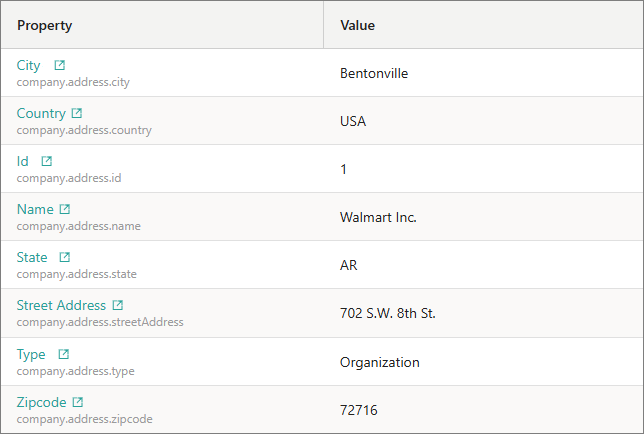
Example of golden record before and after enrichment
An example of a golden record before enrichment:
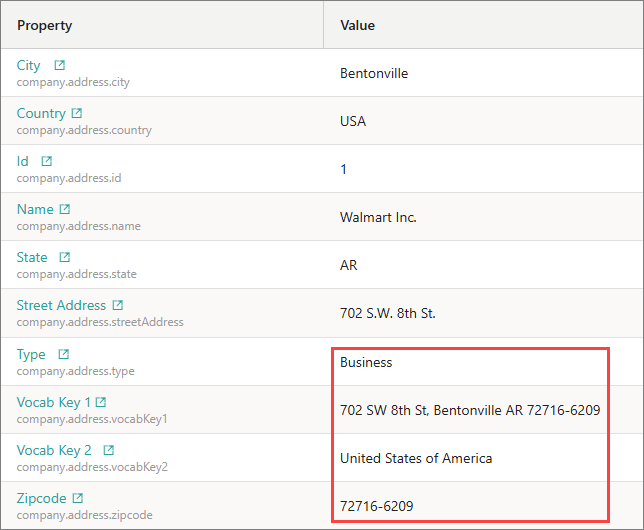
Same record after enrichment:
-
The values for the Type and Zipcode properties were updated.
-
Two new vocabulary keys (Vocab Key 1 and Vocab Key 2 were added).
Sample response
Provided below is an example of the response you would receive for the same request in Postman. If you need an additional address line in your golden records, select the relevant fields from the response and add them to the process response script provided earlier on this page. For example, you could include the Latitude and Longitude fields.
URL
https://address.melissadata.net/V3/WEB/GlobalAddress/doGlobalAddress?id=key&org=Walmart Inc.&a1=702 S.W. 8th St.&loc=Bentonville&admarea=AR&ctry=USA&postal=72716&act=check,verify&format=JSON
Response
{
  "Version": "9.4.1.1228",
  "TransmissionReference": "",
  "TransmissionResults": "",
  "TotalRecords": "1",
  "Records": [
    {
      "RecordID": "1",
      "Results": "AC16,AV24,GS05",
      "FormattedAddress": "Walmart Inc.;702 SW 8th St;Bentonville AR  72716-6299",
      "Organization": "Walmart Inc.",
      "AddressLine1": "702 SW 8th St",
      "AddressLine2": "Bentonville AR  72716-6299",
      "AddressLine3": "",
      "AddressLine4": "",
      "AddressLine5": "",
      "AddressLine6": "",
      "AddressLine7": "",
      "AddressLine8": "",
      "SubPremises": "",
      "DoubleDependentLocality": "",
      "DependentLocality": "",
      "Locality": "Bentonville",
      "SubAdministrativeArea": "Benton",
      "AdministrativeArea": "AR",
      "PostalCode": "72716-6299",
      "PostalCodeType": "U",
      "AddressType": "F",
      "AddressKey": "72716629902",
      "SubNationalArea": "",
      "CountryName": "United States of America",
      "CountryISO3166_1_Alpha2": "US",
      "CountryISO3166_1_Alpha3": "USA",
      "CountryISO3166_1_Numeric": "840",
      "CountrySubdivisionCode": "US-AR",
      "Thoroughfare": "SW 8th St",
      "ThoroughfarePreDirection": "SW",
      "ThoroughfareLeadingType": "",
      "ThoroughfareName": "8th",
      "ThoroughfareTrailingType": "St",
      "ThoroughfarePostDirection": "",
      "DependentThoroughfare": "",
      "DependentThoroughfarePreDirection": "",
      "DependentThoroughfareLeadingType": "",
      "DependentThoroughfareName": "",
      "DependentThoroughfareTrailingType": "",
      "DependentThoroughfarePostDirection": "",
      "Building": "",
      "PremisesType": "",
      "PremisesNumber": "702",
      "SubPremisesType": "",
      "SubPremisesNumber": "",
      "PostBox": "",
      "Latitude": "36.363516",
      "Longitude": "-94.183177",
      "DeliveryIndicator": "U",
      "MelissaAddressKey": "2153275541",
      "MelissaAddressKeyBase": "",
      "PostOfficeLocation": "",
      "SubPremiseLevel": "",
      "SubPremiseLevelType": "",
      "SubPremiseLevelNumber": "",
      "SubBuilding": "",
      "SubBuildingType": "",
      "SubBuildingNumber": "",
      "UTC": "UTC-06:00",
      "DST": "Y",
      "DeliveryPointSuffix": "",
      "CensusKey": "050070205041002",
      "Extras": {}
    }
  ]
}